
Handheld Laser Welder Red Light On but No Laser Output: Causes and Troubleshooting Guide
In daily operation of handheld laser welding machines, some users encounter a confusing fault: the welding gun shows a red aiming light, but when the trigger is pressed, no welding laser is emitted. The machine appears powered on, the interface looks normal, yet welding cannot proceed.
This article provides a systematic troubleshooting guide for this issue, based on real-world service experience with fiber handheld laser welders. The goal is to help operators and maintenance personnel quickly identify the root cause, reduce downtime, and restore normal laser output safely.
Understanding the Difference Between Red Light and Welding Laser
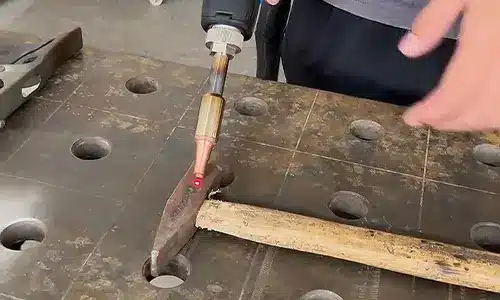
Before troubleshooting, it is important to understand how a handheld laser welder works.
- The red light is a low-power diode used only for positioning and aiming.
- The actual welding laser is a high-power fiber laser (typically 1000W–3000W) responsible for metal fusion.
These two systems are electrically and functionally independent. Therefore, seeing a red light does not guarantee that the welding laser is enabled or healthy. When the red light is present but no laser output occurs, the problem is usually related to safety interlocks, grounding, or laser source protection mechanisms.
Cause 1: Poor Grounding or Improper Workpiece Contact

One of the most common reasons for this fault is an abnormal ground connection.
Why grounding matters
Handheld laser welding machines rely on a stable electrical grounding loop for safety. If the system detects insufficient grounding, the controller may block laser emission while still allowing the red aiming light to function.
Typical grounding issues
- Rust, paint, or oxide layer on the workpiece surface
- Ground clamp attached to coated or dirty metal
- Loose or damaged grounding cable
How to troubleshoot
- Clean the grounding area to bare metal using sandpaper or a grinder
- Secure the ground clamp firmly to the workpiece
- Slightly move the clamp during testing to check for intermittent contact
If the laser output appears or disappears when the clamp position changes, the root cause is almost certainly poor grounding.
Cause 2: Laser Enable Switch or Safety Interlock Disabled

Another frequent reason is that the laser enable function has been turned off, either accidentally or during previous adjustments.
Common scenarios
- The key switch or laser enable button is in the OFF position
- A software setting related to laser activation is disabled
- Emergency stop (E-stop) was pressed and not reset
- The machine is still in maintenance or protection mode
In many systems, even when the laser is disabled, the red aiming light will still operate normally, which can mislead operators into thinking the machine is ready for welding.
What to check
- Confirm the laser enable / laser on switch is active
- Check the control panel for warning icons or safety indicators
- Ensure emergency stop buttons are fully released
- Restart the system if necessary and re-confirm all safety states
Cause 3: Internal Laser Source Alarm or Protection State
If grounding and enable settings are confirmed normal, the issue may originate from the laser source itself.
Modern fiber laser welders are equipped with self-protection and diagnostic systems. When abnormal conditions are detected, the controller will block laser emission while allowing auxiliary systems, such as the red light, to remain active.
Possible internal alarms
- Laser source over-temperature protection
- Power supply abnormality
- Fiber connection or optical path fault
- Communication error between controller and laser source
Recommended solution
Use the manufacturer’s diagnostic software or service interface to:
- Read laser alarm codes
- Check real-time operating parameters
- Identify whether the laser source is in a locked or fault state
If internal alarms are present, professional technical support or factory service may be required. Continuing operation without resolving these alarms is not recommended.
Step-by-Step Troubleshooting Checklist
To resolve the issue efficiently, follow this sequence:
- Inspect grounding – clean contact surface and secure clamp
- Verify laser enable status – hardware switches and software settings
- Check safety systems – emergency stops, covers, interlocks
- Access diagnostic data – identify laser source alarms
This structured approach prevents unnecessary disassembly and minimizes downtime.
Conclusion
When a handheld laser welder shows a red aiming light but produces no welding laser output, the cause is rarely random. In most cases, it can be traced to:
- Poor or unstable grounding
- Laser enable or safety interlock disabled
- Internal laser source protection or fault
Because the red light and welding laser operate independently, the presence of red light only confirms partial system readiness. A methodical inspection of grounding, safety settings, and laser diagnostics is the most effective way to restore normal operation.
For long-term reliability, regular maintenance, proper operator training, and routine inspection of grounding and safety systems are strongly recommended.
If the problem persists after basic checks, contacting the equipment manufacturer or qualified service engineers is the safest and most efficient next step.
If the issue persists, professional diagnostic support from the manufacturer is recommended.
Kindly contact Chutian Laser’s expert via below button.
 Chinese